<?xml version="1.0" encoding="utf-8"?>
<feed xmlns="http://www.w3.org/2005/Atom">
	<title>Brooke's code blog</title>
	<author>
		<name>Brooke Hart</name>
		<email>brooke@curly.kiwi</email>
		<uri>https://curly.kiwi</uri>
	</author>
	<link rel="self" href="https://code.curly.kiwi/feed.xml"/>
	<id>https://code.curly.kiwi/</id>
	<updated>2026-02-27T13:00:00+13:00</updated>
	<entry>
		<title>Using git while trans</title>
		<id>https://code.curly.kiwi/2026/02/27/using-git-while-trans/</id>
		<published>2026-02-27T13:00:00+13:00</published>
		<updated>2026-02-27T13:00:00+13:00</updated>
		<content type="xhtml">
			<div xmlns="http://www.w3.org/1999/xhtml">
				<p>Git is <em>the</em> version control system. Yes, others exist, but if you're writing code you're probably using git.</p>

				<p>Git was not designed with people's names changing in mind. This is a problem, because people's names do change for many reasons. The most common one many people will be familiar with is women changing their surname when marrying a man.</p>

				<p>The one I am concerned about is the name change that trans people go through as part of a social transition. Unlike changing a surname at marriage, in which a person's "maiden name" can remain common knowledge, changing your name during a transition leaves behind what we commonly call a "deadname".</p>

				<p>Revealing a trans person's deadname is a safety issue, which is a problem when working with git.</p>

				<h2>Removing your deadname from displayed logs</h2>

				<p>There is a built-in utility in git that allows displaying commits with an updated name. That is <a href="https://git-scm.com/docs/gitmailmap" target="_blank">git mailmap</a>. It allows you to create a `.mailmap` file in the root of a git repository that contains lines like this:</p>

				<pre><code>Correct Name &lt;correct.email@company.tld&gt; &lt;commit.email@company.tld&gt;</code></pre>

				<p>With a <code>.mailmap</code> file in place, git tools such as <code>git log</code> and <code>git blame</code> will display names found in a <code>.mailmap</code> file for commits that used an email address identified in there.</p>

				<p>In order to find out what email addresses might exist against your deadname, you can run this command to see what commit authors exist in a repo's history:</p>

				<pre><code>git shortlog --summary --email</code></pre>

				<p>This will display an alphabetical list of commit author names and their associated email addresses, with the number of commits listed to the left. The same name with a different email address is treated as a different commit author.</p>

				<p>Adding a <code>.mailmap</code> file is a useful way to effectively update the name against all your old commits without having to rewrite git history. This is useful because rewriting history is often not an option, especially in work environments.</p>

				<p>However, this approach has some downsides as well:</p>

				<ul>
					<li>If the email address used for your commits contains your deadname, as is common in work environments, then it will be exposed to anyone viewing the <code>.mailmap</code> file.</li>
					<li>GitHub, by far the most commonly used git hosting platform, at the time of writing does not support <code>.mailmap</code> and will still display your deadname against your old commits.</li>
					<li>The original log, including your deadname, still exists and can be revealed by modifying or removing the <code>.mailmap</code> file.</li>
				</ul>

				<p>These shortcomings are only surmountable by rewriting history.</p>

				<h2>Removing your deadname from commit author data</h2>

				<p>Git does have a built-in feature called <code>filter-branch</code> that can be used for rewriting history, but for years now it's been recommended against. Instead, the git documentation now officially recommends the use of an external Python script called <a href="https://github.com/newren/git-filter-repo" target="_blank">git-filter-repo</a>.</p>

				<p>You can use <code>git-filter-repo</code> to rewrite the history of a git repository. It expects to always be run against a fresh clone of your repo, so before using it you should create a fresh clone to work in. Using <code>git-filter-repo</code> will also remove your repo's remotes, this is intentionally added friction to encourage verifying your changes before force pushing them to the remote.</p>

				<p>You can use <code>git-filter-repo</code> to modify author information against commits based on the contents of a <code>.mailmap</code> file:</p>

				<pre><code>git filter-repo --use-mailmap</code></pre>

				<p>If you want to use an external file (e.g. because a <code>.mailmap</code> file already exists for this repo and you only want to rewrite _your_ commits) you can also use an external file like this:</p>

				<pre><code>git filter-repo --mailmap &lt;filename&gt;</code></pre>

				<p>Note that, because <code>git-filter-repo</code> expects to work on a fresh clone, you'll want your external file to exist outside your repo's root directory.</p>

				<p>Once you've done this, you can re-check the list of commit authors using <code>git shortlog</code> like in the example above. Make sure to remove any of your lines in a <code>.mailmap</code> file first, so you don't accidentally obscure any commits under your deadname at this point.</p>

				<p>Once confirmed, you can add your remote back and force push your changes, e.g.</p>

				<pre><code>git remote add origin &lt;url-to-origin&gt;
		git push --all --force</code></pre>

				<h2>Removing your deadname from committed files</h2>

				<p>Rewriting history like this won't remove a <code>.mailmap</code> file. If you don't want that file in your repo's git history either because it reveals your deadname then you'll need to remove it. If you want it removed from the history itself, you can also use the sensitive data removal feature <code>git-filter-repo</code> to rewrite history in a way that removes a file completely.</p>

				<p>Remember, you'll need a (new) fresh clone to do this.</p>

				<pre><code>git filter-repo --sensitive-data-removal --invert-paths --path .mailmap</code></pre>

				<p>If you have other files that may have once contained your deadname, such as a <code>package.json</code> file, you can also use the sensitive data removal tool to change these.</p>

				<p>First, you'll need to create an expressions file defining what text to replace. For example:</p>

				<pre><code>Deadname==>My Name</code></pre>

				<p>Then you can run a history-rewriting find and replace using that file by running this command:</p>

				<pre><code>git filter-repo --sensitive-data-removal --replace-text &lt;path-to-expressions-file&gt;</code></pre>

				<p>Be very careful with this step, as a global find and replace could result in unanticipated changes.</p>

				<p>Once you're finished removing this sensitive data and you've verified that it worked as expected, you can force push your changes to update the history on the remote.</p>

				<pre><code>git push --all --force</code></pre>

				<h2 id="feedback">Feedback</h2>

				<p>If you know of any other tips for removing your deadname from a git repo, I'd like to hear them! <a href="mailto:brooke+code-blog@curly.kiwi&amp;subject=Feedback: Using git while trans">Please email me your feedback</a>.</p>
			</div>
		</content>
	</entry>
	<entry>
		<title>Using TypeScript to help with handling all cases</title>
		<id>https://code.curly.kiwi/2024/10/11/using-typescript-to-help-with-handling-all-cases/</id>
		<published>2024-10-11T19:00:00+13:00</published>
		<updated>2024-10-11T19:00:00+13:00</updated>
		<content type="xhtml">
			<div xmlns="http://www.w3.org/1999/xhtml">
				<p><a href="https://www.typescriptlang.org/" target="_blank">TypeScript</a> is a really useful tool for finding potential issues with JavaScript code while it's still in your IDE. It works by letting you annotate your JavaScript with type information, so your IDE has enough information to tell you if you're treating something like it's a different type.</p>

				<p>The main downsides of using it are that you need a build system with a step that strips out all the type annotations to leave you with plain JavaScript that browsers can understand, and that it's a new language to learn on top of JavaScript. Personally I think the upsides well outweigh the downsides, and I use TypeScript in all my JavaScript projects now.</p>

				<p>In this article, I want to go over a pattern that I've found particularly useful, which relies on a few TypeScript features.</p>

				<p>I really like using <a href="https://www.typescriptlang.org/docs/handbook/typescript-in-5-minutes-func.html#discriminated-unions" target="_blank">discriminated unions</a>, where I might have code that needs to handle several different types of object. That code might look something like this (swap out <code>if</code>/<code>else if</code> for <code>switch</code>/<code>case</code> if that's what you prefer):</p>

				<pre><code>if (item.type === ItemType.TYPE_A) {
	// Do something to handle type A
} else if (item.type === ItemType.TYPE_B) {
	// Do something to handle type B
}</code></pre>

				<p>The danger of this approach, in regular JavaScript, is that if you ever add a new type to your list of types, it needs to be handled somehow in every place where you have a block like this. That's where TypeScript can come in, by taking advantage of <a href="https://www.typescriptlang.org/docs/handbook/2/functions.html#function-overloads" target="_blank">function overloads</a>:</p>

				<pre><code>export function assertAllUnionMembersHandled(value: never): never;
export function assertAllUnionMembersHandled(value: unknown): never {
	throw new TypeError(`Union member ${value} was not handled.`);
}</code></pre>

				<p>When defining function overloads with TypeScript, first you list each function signature (starting with the most specific, as the first ones take priority) and then you write the actual function implementation with its own signature. When you call the function, the implementation signature is essentially ignored, so in this case your IDE will treat it as having the signature <code>(value: never) => never</code>.</p>

				<p>This means, if you try to pass in anything that TypeScript thinks has a type other than <code>never</code>, your IDE will highlight it as an error. <code>never</code> is a funny type, I find it's most useful to think of it as a union type with zero members. So as you narrow a member type like <code>'A' | 'B' | 'C'</code>, once all three members have been removed through <a href="https://www.typescriptlang.org/docs/handbook/2/narrowing.html" target="_blank">type narrowing</a> you'll have zero members remaining, and that's <code>never</code>.</p>

				<p>You can take advantage of this when handling all members of a union type by calling this function in the <code>else</code> (or <code>default</code>) part of your block:</p>

				<pre><code>if (item.type === ItemType.TYPE_A) {
	// Do something to handle type A
} else if (item.type === ItemType.TYPE_B) {
	// Do something to handle type B
} else {
	assertAllUnionMembersHandled(item);
}</code></pre>

				<p>Now, if you extend <code>item</code> to have a third possible type, TypeScript will see <code>item.type</code> as having that new member as its type, and highlight it as an error. If you have followed this pattern in every place where you need to handle each different member of a union type, they'll all be identified as errors that can guide you to handling your new type wherever necessary.</p>

				<p>Here's <a href="https://www.typescriptlang.org/play/?#code/KYDwDg9gTgLgBAMwK4DsDGMCWEVwIYDOBwsAggDbkCqK2KAssALYBGJBAEnigCbnA8AFADc85JMABccFMGEkAlNNnyoAbgBQoSLESoMdfERIwK1Wjkat2XXvyGjxUuKgDWKCAHcUSmXJJwAN4aAJAwABZQXn6ecAAqAJ5gwACiUFFQggAGNIZMzGxQcAAkgY4SAL5wnoQyEPDh3HwCAHRZCpoVGhpoOATwAJIwzInJcAC8QRpwM-EAmgAKKQD6pNIA5KTrADTTs3GLKwBCG0c7ezMHS8sAwhs351W1vSj9mjBJwHBDI58TcIIPskIAhvsMmKNgAoANquYAJEFwIHARE-CGfAC6mg0yLBzH+wVmSM+0mRqPBkJaVxWpE0RPKzhQSGs6g0VQAPlMicjSZ9yb9klTDssjnTZgzpP0oJgUABzTpwTmE2Y84nA0FoynU25imYSuAsCAQfjcTrYnjANDkPBQL4vfpwTDg6Ro7EAejdcBa3u6mFBgidzBauPGobx6MF2tICi5sw9cFszTVX1IjtwBAg+WqeASbLgwHIxEd-sDTGDf1Dk01nyF1yOMeVM3jif4ybgRzTcAzWZqufjVQLRb9ANL5bGlfDWuFNwbcHjAB4ALRwGi9Jj5FDwCKYAhwcgyr4wCBd4CH8JfEgZOCy494XsXOeeluHv43Tvdr73geFr6NozEMhKFySwChsJp7ADcEOkfOAl2+C1Nz9TABCMfBcEvaADUtPAkCLTwvkaeQUHWBpwJQ3EbjZDQgA" target="_blank">an example in the TypeScript Playground</a> where using this function highlights an error where a union member is unhandled. Unfortunately, you'll see that the error message is not exactly clear:</p>

				<blockquote>
					Argument of type '{ type: "C"; value: boolean; }' is not assignable to parameter of type 'never'.<br/>
					The call would have succeeded against this implementation, but implementation signatures of overloads are not externally visible.<br/>
					<pre><code>const item: {
	type: typeof ItemType.TYPE_C;
	value: boolean;
}</code></pre>
				</blockquote>

				<p>That's the biggest downside of this function. It highlights where those errors are, but not in a way that's particularly useful if you don't already understand how it's used or what those errors mean. The best way I've found so far for managing this is to add an explanatory JSDoc comment to the <code>assertAllUnionMembersHandled</code> function itself, so if anyone is confused by the error and hovers over the function itself, they can see an explanation of how to resolve errors like this. For example, this is the relevant part of the JSDoc comment I use in the code for <a href="https://orange-twist.curly.kiwi/" target="_blank">Orange Twist</a>:</p>

				<blockquote>
					<p><b>Investigating an error?</b></p>

					<p>You probably need to add additional code to handle one or more values of an enum or another union type.</p>

					<p>You can hover over the argument passed into this function to see the values that aren't handled currently. For example, if you see:</p>

					<pre><code>const foo: "A" | "B";</code></pre>

					<p>That means the union members <code>'A'</code> and <code>'B'</code> were not handled.</p>
				</blockquote>

				<p>If the code is run without fixing any type errors, the default behaviour in my example above is for it to throw an error. That can show up in the browser console during runtime, but it's a <em>lot</em> easier to take advantage of static analysis to find and fix these errors before they ever reach the browser than it is to make sure you're testing every possible code branch so you won't miss a potential thrown error.</p>
			</div>
		</content>
	</entry>
	<entry>
		<title>Speeding up Orange Twist's first load</title>
		<id>https://code.curly.kiwi/2024/08/03/speeding-up-orange-twists-first-load/</id>
		<published>2024-08-03T22:27:00+12:00</published>
		<updated>2024-08-03T22:27:00+12:00</updated>
		<content type="xhtml">
			<div xmlns="http://www.w3.org/1999/xhtml">
				<p><a href="https://orange-twist.curly.kiwi" target="_blank">Orange Twist</a> has been my main personal project just over a year now. It's a web app for managing tasks and notes, which I've tailored to work the way I think. But it's also my playground where I toy with new web technologies, experiment with different approaches, and find myself running into new obstacles that force me to learn.</p>

				<p>If you like coding, I can't recommend having a personal project highly enough. I've found it to be a wonderful learning tool. It's been especially gratifying to also build something useful. I've been using Orange Twist to manage its own development, my work tasks, and my general life admin tasks.</p>

				<p>This article is about some new stuff I learned and used while working on Orange Twist recently, where I managed to improve the performance of its first load.</p>

				<h2>Orange Twist's initial load</h2>

				<p>Orange Twist is built with <a href="https://preactjs.com/" target="_blank">Preact</a>, and it stores all its data in the browser. Since it's hosted on GitHub Pages, my only option for a back end is a static HTTP server anyway, and I like the way keeping all a user's data on their machine and never sending it to a server goes against the grain of some of the modern web's worst tendencies.</p>

				<p>Recently, in my day job where I work on the front end of a <em>different</em> web app, I've been trying to figure out how to improve UI performance. It's turned out to be more interesting and less frustrating than I'd expected, so I've also ended up looking into improving the performance of Orange Twist too.</p>

				<p>There are a few different potential sources of slow performance of websites and web apps. Usually an area of focus would be seeing if the back end could respond to network requests faster, but for this app that isn't really a thing (though I was able to find a way to reduce my bundle sizes).</p>

				<p>I was definitely noticing a lag in the app loading initially, especially when using it on my phone. It would sort of stutter rapidly through a few different iterations of partially loaded data, before finally finishing.</p>

				<p>When Orange Twist's main page first loads, there are essentially two things it needs to do:</p>

				<ul>
					<li>Load a few different pieces of data out of an Indexed DB</li>
					<li>Use Preact to render the DOM tree based on that data, once it's loaded</li>
				</ul>

				<p>I've been using Orange Twist for quite a few months now, which means I've accumulated some data. On the main page, Orange Twist renders out a section for each day that has data, and those days might render a note and a set of tasks with names and statuses.</p>

				<p>When the rendering is finally done, then it scrolls to the section for current day, which is useful but unfortunately felt like another bit of jank during the initial load.</p>

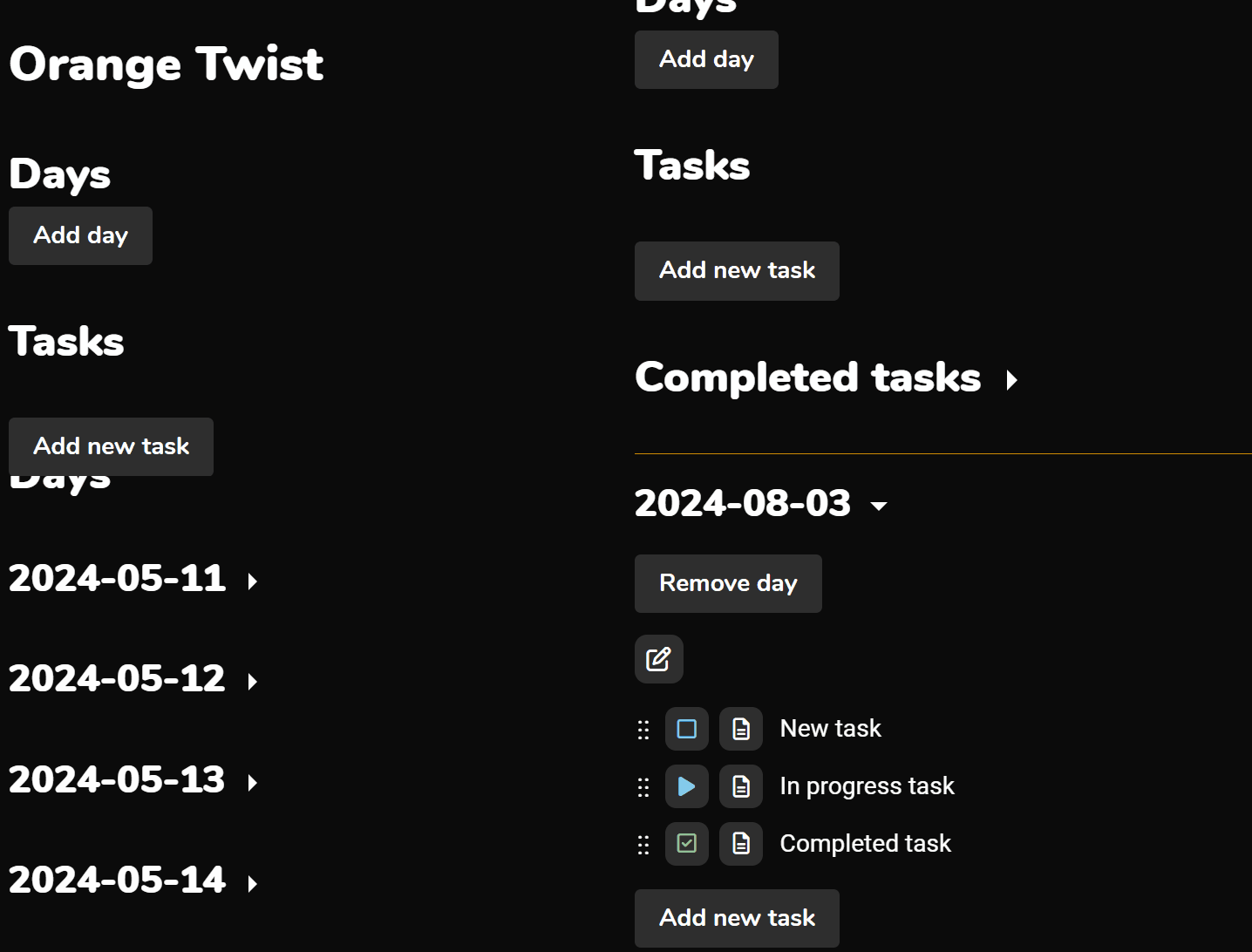
				<p>This animation doesn't have the real timing, but it shows the steps that the browser would stutter through on each load:</p>

				<figure>
					<img src="https://code.curly.kiwi/assets/images/2024-08-03-orange-twist-loading-jank.gif" alt="The browser appears to scroll down slightly, then load a bunch of days, before finally scrolling to the current day and showing a list of tasks."/>
				</figure>

				<h2>The event loop</h2>

				<p>A brief aside before we get into what I found and what I changed, it's useful to have some understanding of the JavaScript event loop. I highly recommend Lydia Hallie's excellent video on the topic (seriously I wish I had this resource when I was a junior developer):</p>

				<p><a href="https://www.youtube.com/watch?v=eiC58R16hb8" target="_blank">JavaScript Visualized - Event Loop, Web APIs, (Micro)task Queue</a></p>

				<p>But to state the relevant bits briefly, a JavaScript <strong>task</strong> runs on the main thread, also known as the UI thread, and while a task is running the browser can't paint any updates to the page.</p>

				<p>Many web APIs, like <code>setTimeout</code>, queue up a new task to run at a later time. These allow the browser to take a break in between tasks to do other work, like painting the page.</p>

				<p>Newer Promise-based APIs will queue <strong>microtasks</strong> instead, and a task won't finish until all queued microtasks have also completed. Often these will result in new tasks anyway, but some code (like using <code>Promise.resolve</code> to create a Promise that's already resolved) can extend the duration of the current task.</p>

				<p>So if the browser tab looks "frozen", it's probably because there's a long-running task that's occupying the main thread. Now, back to the performance stuff.</p>

				<h2>Janky loading</h2>

				<p>I've found the performance profiling tool in Chrome's developer tools particularly useful for getting a rough idea of why the browser is behaving in a particular way during this initial load. While it can let you drill right down into individual functions getting called if you need that level of detail, at the top level it will do useful things like highlight long-running tasks.</p>

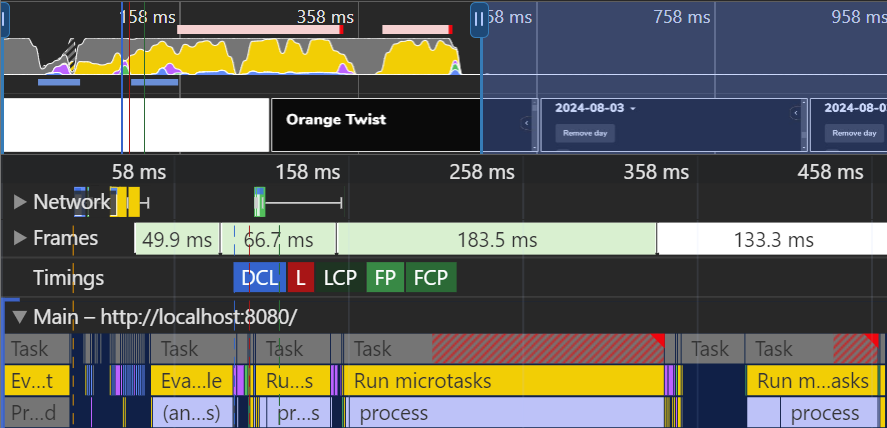
				<p>For example, here's what running the profiler during the initial load of a production build of v1.5.3 of Orange Twist (before any performance fixes) looks like on my machine:</p>

				<figure>
					<img src="https://code.curly.kiwi/assets/images/2024-08-03-performance-slow.png" alt="A collection of graphs highlighting two long-running tasks, with the total loading time being around 450ms."/>
				</figure>

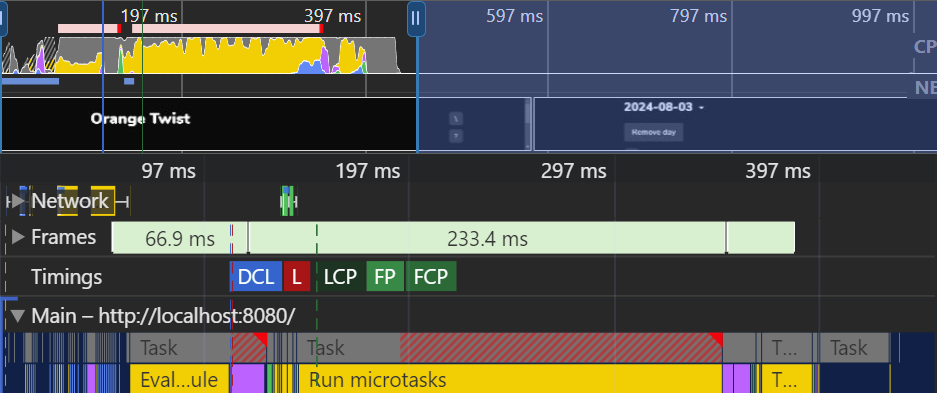
				<p>The first thing I found was causing a slowdown was that Preact was having to re-evaluate the DOM tree after each piece of data was loaded from Indexed DB. By making it wait until <em>all</em> the data was loaded before it rendered anything using that data, I was able to reduce the two long tasks into a single long task. This made the initial load <em>look</em> a bit less janky, but it didn't help too much with the overall speed itself.</p>

				<figure>
					<img src="https://code.curly.kiwi/assets/images/2024-08-03-performance-mid.png" alt="A performance profile in Chrome's devtools showing one main long task, with the total loading time being around 400ms."/>
				</figure>

				<h2>Deferring some of the work</h2>

				<p>When Orange Twist has a lot of data, the main page renders quite a large DOM tree. Since I'd already reduced the number of times this tree was being rendered, I started thinking about if there was a way I could make the DOM tree smaller.</p>

				<p>Aside from the current day, all of those days Orange Twist renders on its main page are in sections that are collapsed by default. So really, all I need to render initially for each of those parts is their titles. However, there's a really nice feature of the <code>&amp;lt;details&amp;gt;</code> "disclosure" element in some browsers where you can find content in collapsed disclosures using the "Find in page" feature. So I didn't want to just wait until a section was expanded before rendering it because it would break that feature.</p>

				<p>My initial thought was to use <code>setTimeout</code> with a randomised timeout, so the sections would be rendered gradually instead of all at once. That should give the browser time to "breathe" so it could render frames and react to user input in the meantime. But then by chance I ran across a web API that I hadn't seen before which seemed perfect for this use case: <a href="https://developer.mozilla.org/en-US/docs/Web/API/Window/requestIdleCallback" target="_blank"><code>requestIdleCallback</code></a>.</p>

				<blockquote>
					<p>The <code>window.requestIdleCallback()</code> method queues a function to be called during a browser's idle periods. This enables developers to perform background and low priority work on the main event loop, without impacting latency-critical events such as animation and input response.</p>

					<cite><a href="https://developer.mozilla.org/en-US/docs/Web/API/Window/requestIdleCallback" target="_blank">Window: requestIdleCallback() method | MDN</a></cite>
				</blockquote>

				<p>Perfect! Instead of trying to guess when the browser wouldn't be busy by using a random timeout, I could just ask it to wait until it's idle. Unfortunately, <a href="https://caniuse.com/requestidlecallback" target="_blank">Safari doesn't support <code>requestIdleCallback</code> at the moment</a> (though it is supported in the current Technical Preview) so I've still used that random timeout method as a graceful degradation.</p>

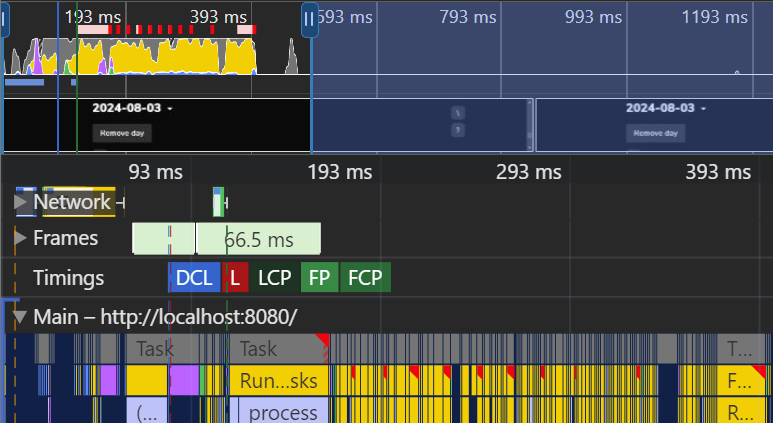
				<p>After those two optimisations, and a couple of other adjustments to reduce the size of my JavaScript bundle, the time taken for Orange Twist's initial load with my testing data to complete went from <strong>400-450ms</strong> down to <strong>90-150ms</strong>.</p>

				<figure>
					<img src="https://code.curly.kiwi/assets/images/2024-08-03-performance-fast.png" alt="A performance profile in Chrome's devtools, showing a task that barely qualifies as long, followed by a long tail of spread out very fast tasks. The last frame is rendered well before 200ms."/>
				</figure>

				<p>(Those red flags on the yellow boxes are warnings about idle callbacks being delayed, usually by something like 2-3ms)</p>

				<p>Unsurprisingly, the initial load of the app feels <em>far</em> faster now. Technically it still takes around 400ms for everything to finish rendering, but because the important stuff is done first and the rest is told to fill in the space when the browser is idle, the app feels (and is!) much more immediately responsive.</p>

				<p>There is still a brief flash of the UI without any content loaded, which I'm interested in trying to improve later on. You can see that in this animation, though the timing is tweaked to make it a bit more obvious:</p>

				<figure>
					<img src="https://code.curly.kiwi/assets/images/2024-08-03-orange-twist-loading-improved.gif" alt="A brief flash of the Orange Twist UI with no inner content, before the fully loaded content appears."/>
				</figure>

				<p>If you're interested in looking at the code changes I talked about in this article, here are links to my PRs against Orange Twist:</p>

				<ul>
					<li><a href="https://github.com/Cipscis/orange-twist/pull/174" target="_blank">Wait for all data to be loaded before rendering</a></li>
					<li><a href="https://github.com/Cipscis/orange-twist/pull/176" target="_blank">Defer rendering hidden content until the browser is idling</a></li>
				</ul>
			</div>
		</content>
	</entry>
</feed>